
Have you noticed your Bissell vacuum isn’t picking up dirt like it used to? A clogged or dirty filter could be the culprit. Changing the filter is a simple yet essential task that can restore your vacuum’s performance and keep your home clean.
Key Takeaways
- Regular Maintenance: Schedule filter changes every 3 to 6 months to maintain your Bissell vacuum’s optimal performance.
- Types of Bissell Vacuums: Understand the specific benefits of different models: upright, canister, and robotic vacuums for varied cleaning needs.
- Importance of Clean Filters: Changing filters improves air quality, enhances suction power, extends the vacuum lifespan, and saves on repair costs.
- Essential Tools: Prepare necessary tools such as replacement filters, screwdrivers, scissors, and a clean cloth for a smooth filter replacement process.
- Safe Handling: Always unplug the vacuum and handle parts carefully to prevent damage or loss during the filter change.
Overview of Bissell Vacuums
Bissell vacuums are popular for their reliability and effectiveness in maintaining clean homes. They offer various models suited for different cleaning needs, including upright, canister, and robotic options.
Types of Bissell Vacuums
- Upright Vacuums: Ideal for deep cleaning carpets, providing powerful suction and multiple attachments for versatility.
- Canister Vacuums: Offers maneuverability, making it easy to clean stairs and hard-to-reach areas.
- Robotic Vacuums: Provides automated cleaning solutions for busy households, allowing for scheduled cleanings while you’re away.
Features of Bissell Vacuums
- Multi-Cyclonic Technology: Ensures strong suction by separating dirt and debris.
- Washable Filters: Allows for easy maintenance and helps extend filter life.
- Lightweight Design: Makes it easier to carry between rooms and up stairs.
- Regular Filter Changes: Schedule filter changes every 3 to 6 months to ensure optimal performance.
- Cleaning the Brush Roll: Remove hair and debris regularly to maintain effective cleaning.
- Check for Blockages: Inspect hoses and attachments monthly to ensure unrestricted airflow.
By understanding the different models and features, you can choose the Bissell vacuum that best meets your cleaning needs. Keeping up with maintenance like filter changes maintains your vacuum’s efficiency and extends its lifespan.
Importance of Changing Filters
Changing filters in your Bissell vacuum is crucial for maintaining optimal performance and ensuring effective dirt pickup. Clean filters contribute to better air quality and a more efficient cleaning process.
Recommended Products

Compatible with Bissell 2998 Multiclean Vacuum with Hepa, Fit for Bissell 2998 2999 2849 3000 3057 28492 28524 2920 3059 3399 2852 3125W 31269 Vacuum
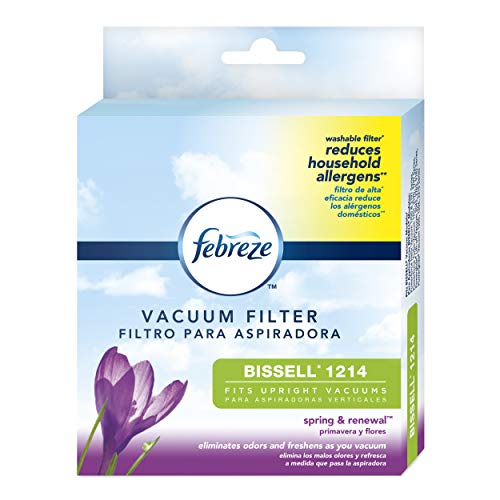
Washable filter helps reduce household allergens such as tree, grass, and ragweed pollens.
Benefits of Clean Filters
- Improved Air Quality: Clean filters trap allergens and dust, helping to keep indoor air fresh and breathable.
- Enhanced Suction Power: Regularly changing filters prevents clogs, ensuring strong suction that picks up dirt and debris effectively.
- Extended Vacuum Lifespan: Maintaining clean filters reduces strain on the motor, potentially increasing the vacuum’s lifespan.
- Cost Savings: Avoid costly repairs or replacements due to neglecting the filter maintenance.
Frequency of Filter Changes
Changing the filters every 3 to 6 months is ideal for most Bissell vacuums. If you frequently vacuum pet hair or have allergies, consider changing them every 1 to 3 months. Regularly checking your filters helps ensure consistent performance and prevents buildup that could hinder your vacuum’s effectiveness.
Tools Needed for Changing the Filter
Changing the filter on your Bissell vacuum requires a few simple tools. Having the right tools makes the process smoother and more efficient.
Recommended Products

COMPATIBILITY: The powerforce compact filter is great fit for Bissell PowerForce Compact Lightweight Upright 2112, 21129, 2112R, 2112Z, 2112N, 1520, 15204, 15207, 15208, 15209, 1520L, 1520N, 1520R, 1520U, 1520V, 1520W, 1520X, 1520Z, PowerForce Compact Turbo Bagless Upright Vacuum 2690 and for Cleanview Compact Turbo 3437F, 3508 Upright Vacuum. Compare to Part 1604896 / 160-4896
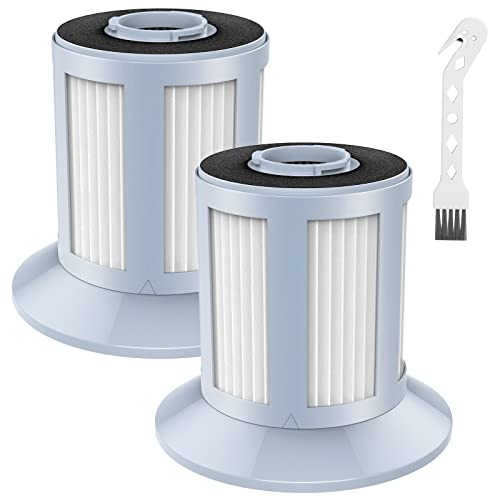
Compatible Model: This replacement vacuum filter is compatible with Bissell Zing Bagless Canister Vacuum series 2156, 2156A, 2156E, 1665, 16652, and 1665W, replacement part number 161-3056, 1613056. Does NOT compatible with bissell vacuum part number 203-1531, 203-1532, 203-1771,1608602

【Perfect Match & Strong Compatibility】The Replacement Filter Compatible with Bissell CleanView XR 200W / CleanView XR Pet 300w/ Powerlifter Turbo Cordless Stick Vacuum Cleaner 3789,3789U,3789X,3797,3797V,3797W, Replace Part #1638010
Recommended Tools
- Replacement Filter: Always use a filter designed specifically for your Bissell model.
- Screwdriver: A Phillips or flathead screwdriver may be needed to remove specific panels.
- Scissors: Use scissors to cut any securing ties on the old filter if applicable.
- Clean Cloth: A damp cloth helps wipe away any dust or debris during the process.
- Unplug the Vacuum: Always unplug your Bissell vacuum before starting any maintenance.
- Wear Gloves: Consider wearing disposable gloves to keep your hands clean and protected.
- Handle Parts Carefully: Be cautious with any screws or small parts to avoid losing them.
Step-by-Step Guide on How to Change Filter on Bissell Vacuum
Changing the filter on your Bissell vacuum is straightforward and essential for maintaining its efficiency. Follow these steps to ensure the process is smooth.
Preparing the Vacuum
Unplug your Bissell vacuum to ensure safety before starting. Gather the necessary tools: a soft cloth for cleaning, replacement filters, and gloves for protection. Check your model’s user manual for any specific instructions related to your vacuum type.
Removing the Old Filter
Locate the filter compartment, which is usually near the dirt container or on the top of the vacuum. Open the compartment carefully. Grasp the old filter and pull it straight out. If it’s stuck, wiggle it gently. Dispose of the old filter properly. Take a moment to clean the area around the filter compartment to prevent dust from re-entering.
Installing the New Filter
Take the new filter out of its packaging. Line it up with the compartment and push it in firmly until it fits snugly. Ensure that it’s seated properly to avoid any air leakage during operation. Close the filter compartment securely.
Testing the Vacuum
Once you’ve installed the new filter, plug the vacuum back in. Turn it on and test it in an area where you regularly clean. Observe its performance and listen for any unusual sounds. If everything runs smoothly, your filter change was successful.
Conclusion
Keeping your Bissell vacuum in top shape is easier than you might think. By regularly changing the filter and following the maintenance tips shared, you’ll ensure it runs smoothly and effectively. A clean filter not only helps with dirt pickup but also contributes to better air quality in your home.
Don’t forget to test your vacuum after changing the filter to make sure everything’s working perfectly. With a little effort, you can enjoy a cleaner home and a longer-lasting vacuum. Happy cleaning!
Frequently Asked Questions
How often should I change the filters in my Bissell vacuum cleaner?
Changing filters in your Bissell vacuum cleaner every 3 to 6 months is recommended. If you have pets or allergies, consider changing them more frequently to maintain optimal performance and air quality.
What are the benefits of clean filters?
Clean filters improve your vacuum’s dirt pickup efficiency, enhance air quality, and prolong the lifespan of the appliance. This maintenance also helps reduce allergens and dust particles in your home.
How do I know if my vacuum filter needs to be changed?
Check your vacuum filter regularly. If it appears dirty, discolored, or clogged, it’s time for a replacement. Many Bissell models also have indicator lights to alert you when the filter needs changing.
Can I clean the filters instead of replacing them?
Some Bissell vacuum filters are washable, meaning you can clean them according to the manufacturer’s instructions. However, if the filter is worn or damaged, it’s best to replace it for optimal performance.
What tools do I need to change the filter in my Bissell vacuum?
Typically, you just need your hands for removing and installing the filter. For some models, a screwdriver may be required. Always refer to the user manual for specific instructions and recommendations.
Is there a specific way to install a new filter?
Yes, always follow the installation instructions provided in your model’s user manual. Ensure the new filter is seated correctly and securely before reassembling the vacuum.
How can I test my vacuum after changing the filter?
After changing the filter, run your vacuum on a small area of carpet to check for improved suction. Listen for any unusual noises and monitor for effective dirt pickup to confirm successful maintenance.
