
Have you ever wished you could control your vacuum without lifting a finger? Imagine coming home to a clean house, all thanks to your Shark vacuum working on command. Connecting your Shark vacuum to Alexa makes this dream a reality, turning your cleaning routine into a seamless experience.
Key Takeaways
- Voice Control Convenience: Connecting your Shark vacuum to Alexa allows for hands-free control, streamlining your cleaning routine.
- Compatible Models: The Shark IQ Robot, Shark ION Robot, and Shark AI Robot are designed for seamless integration with Alexa, ensuring effective voice management.
- Required Devices: To set up the connection, you need a smartphone, an Alexa-enabled device, and a stable Wi-Fi connection for optimal performance.
- Simple Setup Process: Follow straightforward steps, including downloading the Shark Clean app, enabling the Shark Clean skill in the Alexa app, and linking your accounts to ensure proper connection.
- Effortless Commands: Use voice commands like “start cleaning,” “stop cleaning,” and “schedule cleaning” to control your Shark vacuum effectively.
- Troubleshooting Tips: Address common issues by checking Wi-Fi connectivity, verifying skill activation, and ensuring both the vacuum and app are updated for best performance.
Understanding Shark Vacuum Connectivity
Connecting your Shark vacuum to Alexa enhances your cleaning experience by allowing voice control. This setup makes managing your home cleaning tasks more convenient and efficient.
Compatible Shark Vacuum Models
Several Shark vacuum models support Alexa connectivity. Check for compatibility with the following models:
- Shark IQ Robot: This model offers advanced navigation with smart mapping.
- Shark ION Robot: Enjoy hands-free cleaning with voice commands.
- Shark AI Robot: Features enhanced obstacle avoidance and is Alexa-compatible.
Confirm your vacuum’s model by checking the user manual or the manufacturer’s website.
Required Smart Devices
To connect your Shark vacuum to Alexa, certain smart devices are essential:
- Smartphone: Download the Shark Clean app from the App Store or Google Play.
- Alexa-enabled Device: Use any device that supports Alexa, like Amazon Echo or Echo Dot.
- Wi-Fi Connection: Ensure a stable Wi-Fi network for seamless device communication.
Follow the setup instructions in the Shark Clean app for a smooth installation process.
Setting Up Your Shark Vacuum
Setting up your Shark vacuum for Alexa integration is straightforward. Follow these steps to ensure a smooth process.
Recommended Products

INCREDIBLE SUCTION: Powerful Shark suction picks up dirt and debris on all floor types—tackling even the toughest of messes in your home.

HIGH SUCTION POWER: Shark's powerful suction captures dirt, debris, and pet hair across all surfaces—carpets and hard floors alike—making this robot vacuum the ultimate solution for deep, everyday cleaning.
Unboxing and Initial Setup
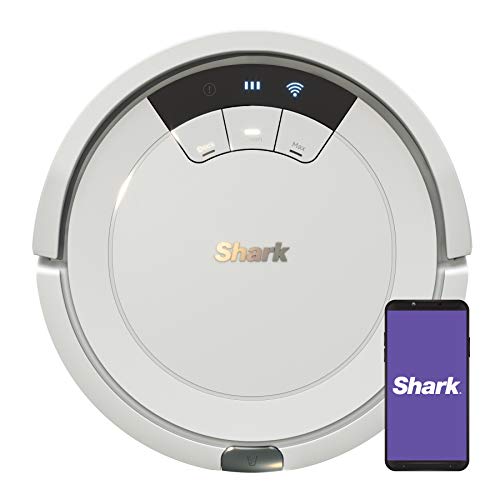
Unbox your Shark vacuum carefully. Inside, you’ll find the vacuum, a charging dock, and the user manual. Plug the charging dock into a power outlet and place the vacuum on the dock. Allow the vacuum to charge fully before setting it up. Once charged, press the power button to turn on the vacuum. Ensure it’s in a location with good Wi-Fi coverage for better connectivity.
Downloading the Shark Clean App
Download the Shark Clean app from the App Store or Google Play Store. Open the app and create an account or log in if you already have one. Follow the prompts to add your Shark vacuum to the app. Ensure your smartphone is connected to the same Wi-Fi network as the vacuum. The app will guide you through connecting your vacuum to your Wi-Fi and Alexa. Once connected, you can manage cleaning schedules and commands directly from the app or via Alexa.
Connecting Shark Vacuum to Alexa
Connecting your Shark vacuum to Alexa enhances your cleaning routine. Follow these steps for seamless integration.
Recommended Products

POWERFUL SUCTION FOR CARPET & HARD FLOORS: Clean carpets and hardwood floors with strong multi-surface suction. This lightweight upright vacuum cleaner lifts dirt, debris, and pet hair for a complete home clean.

POWERFUL SUCTION AND SONIC MOPPING: First, it’s a powerful whole home vacuum on carpets and floors. Second, it’s a powerful vacuum that sonic mops hard floors at the same time.

【 90 Days Hands-Free Cleaning】No more frequent bin emptying. Kilgone self-emptying robot vacuum holds up to 90 days of debris in a 2.5L sealed bag. Just toss the used bag and insert a new one—no dust cloud, no dirty hands. No more bin-emptying worries—this robot vacuum cleaners for home quietly handles the mess while you focus on life.
Enabling the Shark Clean Skill
- Open the Alexa App: Launch the app on your smartphone.
- Access Skills & Games: Tap on the menu icon and select “Skills & Games.”
- Search for Shark Clean: Type “Shark Clean” in the search bar.
- Enable the Skill: Click the “Enable” button. You may need to log in to your Shark account.
Enabling this skill allows Alexa to communicate with your Shark vacuum for voice commands.
- Return to the Alexa App: After enabling the skill, stay in the app.
- Select the Shark Clean Skill: Find the skill you just enabled and tap on it.
- Link Accounts: Click on the “Link Account” button. Follow the on-screen instructions.
- Enter Credentials: Sign in with your Shark account information.
This step links your Shark vacuum to Alexa, allowing you to control your device through voice commands effectively.
Using Alexa with Your Shark Vacuum
Connecting your Shark vacuum to Alexa allows for effortless cleaning through voice commands. You can start, stop, or schedule cleaning tasks without lifting a finger.
Recommended Products

🍀90-Days Hands-Free Cleaning : The H6 Pro Robot Vacuum and Mop features a 3L large-capacity dust collection station, which can quickly dump dirt and dust into the dust bag while preventing clogging. Set your hands free and enjoy a fully automatic cleaning.

LIDAR SMART MAPPING + NO-GO ZONES: Precision LiDAR scans your home and builds an accurate map for efficient, room-by-room cleaning. Set No-Go Zones to keep the mop off rugs, target specific rooms, create schedules, and adjust settings in the app. Ideal for multi-room homes, open-plan layouts, and mixed floor types.

【Bagless Self-Emptying Station & Powerful 18000Pa Suction】The robot automatically empties its dustbin into the large 2.5L dust cup in the base, which can hold up to 45 days of dust and debris—truly hands-free. Combined with intelligent 18000Pa max suction, it thoroughly cleans pet hair and dirt from carpets and hard floors, keeping your home spotless with minimal effort.
Voice Commands for Your Shark Vacuum
- Start Cleaning: Say, “Alexa, start cleaning with my Shark vacuum.” Your vacuum will begin its cycle immediately.
- Stop Cleaning: Use, “Alexa, stop cleaning,” to halt the vacuum at any time.
- Schedule Cleaning: Ask, “Alexa, schedule cleaning for tomorrow at 10 AM,” and your vacuum follows the command.
- Check Status: Question, “Alexa, what’s my Shark vacuum doing?” for updates on its current activity.
Familiarizing yourself with these voice commands enhances your smart home experience and makes maintaining a clean space much simpler.
Troubleshooting Common Issues
If you’re facing challenges with your Shark vacuum and Alexa, consider these solutions:
- Not Responding: Ensure your vacuum is connected to Wi-Fi. Check the Wi-Fi settings in the Shark Clean app.
- Skill Not Found: If Alexa cannot find the Shark Clean Skill, revisit the Alexa app and search for “Shark Clean” to enable it again.
- Linking Accounts: Should account linking fail, double-check your Shark account credentials and attempt to link again.
- Firmware Updates: Confirm that both your Shark vacuum and the app are updated to the latest versions for optimal performance.
These troubleshooting steps help you address common issues swiftly and maintain seamless operation of your Shark vacuum with Alexa.
Conclusion
Embracing the convenience of voice-activated cleaning can truly transform your home routine. Once you’ve connected your Shark vacuum to Alexa you can enjoy a hands-free approach to keeping your space spotless.
Whether you’re scheduling cleanings or giving commands on the fly you’ll find that managing your cleaning tasks becomes easier than ever. Don’t forget to keep an eye on troubleshooting tips to ensure everything runs smoothly.
With just a few simple steps you can make your cleaning experience more efficient and enjoyable. Happy cleaning!
Frequently Asked Questions
How can I control my Shark vacuum with Alexa?
You can control your Shark vacuum with Alexa by linking it through the Shark Clean app. Once connected, you can use voice commands to start, stop, or schedule cleaning tasks easily.
What is the process to set up a Shark vacuum with Alexa?
To set up your Shark vacuum with Alexa, unbox the vacuum and download the Shark Clean app. Ensure Wi-Fi connectivity, then follow the app instructions to connect your vacuum and enable the Shark Clean Skill in the Alexa app.
What should I do if my Shark vacuum isn’t responding to Alexa?
If your Shark vacuum isn’t responding to Alexa, first check Wi-Fi connectivity. Make sure the Shark Clean Skill is enabled and that your accounts are linked correctly. If issues persist, consider checking for app updates or restarting your devices.
Can I use the Shark Clean app instead of Alexa?
Yes, you can manage your Shark vacuum using the Shark Clean app. The app allows you to schedule cleanings and monitor cleaning tasks without using Alexa, offering flexibility in how you control your vacuum.
What troubleshooting tips can help with Alexa integration?
For troubleshooting Alexa integration issues, ensure your Shark vacuum is updated and properly connected to Wi-Fi. Check for any network issues, re-enable the Shark Clean Skill in the Alexa app, and try unlinking and relinking your accounts if problems persist.