
Ever wondered why your vacuum cleaner suddenly stops working right when you need it most? It’s frustrating, isn’t it? Keeping your vacuum charged is essential for maintaining a clean home, but many people overlook this simple task.
Key Takeaways
- Understanding Vacuum Types: Familiarize yourself with different vacuum types (upright, canister, stick, robot, handheld) to choose one that meets your cleaning needs effectively.
- Battery Knowledge: Recognize the benefits of various battery types (NiCd, NiMH, lithium-ion) to ensure optimal charging and performance of your vacuum cleaner.
- Proper Charging Setup: Follow the correct procedures for charging, including using the designated docking station or charger, ensuring a secure connection, and monitoring charge indicators.
- Best Practices for Charging: Adhere to charging best practices such as avoiding overcharging, cleaning battery contacts, and storing in a cool place for extended battery life.
- Maintenance Importance: Regular maintenance, including checking battery levels and following user manual guidelines, enhances performance and prolongs the lifespan of your vacuum cleaner.
- Planning for Cleaning: Always check battery levels before cleaning sessions and plan to charge accordingly to avoid interruptions during your cleaning tasks.
Understanding Your Vacuum Cleaner
Understanding your vacuum cleaner helps keep it charged and ready for use. Familiarity with the device ensures effective cleaning and prolongs its lifespan.
Types of Vacuum Cleaners
You can find various types of vacuum cleaners on the market, each designed for specific tasks:
- Upright Vacuum Cleaners: Ideal for deep cleaning carpets, these vacuums offer powerful suction and larger dust capacity.
- Canister Vacuum Cleaners: With a flexible maneuverability, canister models excel at cleaning hard floors and tight spaces.
- Stick Vacuum Cleaners: Lightweight and portable, stick vacuums are convenient for quick clean-ups and smaller areas.
- Robot Vacuum Cleaners: Automated and efficient, robot vacuums operate independently, making cleaning effortless.
- Handheld Vacuum Cleaners: Best for spot cleaning and tight spaces, handheld vacuums are perfect for car interiors or furniture.
Battery Types and Their Benefits
Battery type influences the performance and charging efficiency of your vacuum cleaner. Here’s a breakdown of common battery types:
- Nickel-Cadmium (NiCd) Batteries: Affordable and widely used, NiCd batteries recharge quickly but may suffer from memory effect, reducing their overall capacity over time.
- Nickel-Metal Hydride (NiMH) Batteries: Offering better capacity than NiCd, NiMH batteries charge faster and are commonly found in modern models.
- Lithium-Ion Batteries: Lightweight and long-lasting, lithium-ion batteries provide consistent power without memory effect, making them ideal for high-performance vacuum cleaners.
Choosing the right vacuum cleaner type and battery can enhance your cleaning routine, ensuring efficient and effective results.
Preparing to Charge Your Vacuum Cleaner
Before charging your vacuum cleaner, ensure you’ve set everything up correctly for optimal performance. A little preparation goes a long way in maximizing battery life and efficiency.
Unboxing and Initial Setup
Unbox your vacuum cleaner carefully, removing all packaging materials. Check that all components are included, such as the charger, attachments, and manuals. Assemble any detachable parts according to the instructions. Place your vacuum cleaner in an accessible area near an electrical outlet to facilitate easy charging later.
Checking Battery Levels
Check the battery level before charging. Most modern vacuum cleaners have indicators that show the current charge status. If your vacuum cleaner uses a removable battery, consider removing it for a more precise reading. Make sure to consult the manual for specific battery level information. A fully charged battery typically takes several hours to reach maximum capacity, so plan your cleaning sessions accordingly.
Step-by-Step Guide on How to Charge Vacuum Cleaner
Charging your vacuum cleaner correctly ensures it runs efficiently and lasts longer. Here’s how to charge different types of vacuum cleaners.
Using the Charging Dock
- Locate the Dock: Find your vacuum cleaner’s charging dock. This dock is typically a small base where you place your vacuum.
- Position the Vacuum: Align your vacuum cleaner with the dock. Some models have guides or magnets to help you position it correctly.
- Plug it In: Ensure the dock is connected to a power source. Check that the indicator light on the dock is on, confirming it’s receiving power.
- Check for Charge Indicators: Look for lights or sounds on your vacuum to confirm charging. Different colors may indicate charging status or readiness for use.
- Leave for Charging: Allow it to charge fully, following the manufacturer’s recommendations, usually 3 to 6 hours.
- Find the Charging Port: Look for a charging port on the vacuum cleaner. This can vary by model, sometimes located on the handle or back.
- Use the Correct Charger: Plug the charger into a power outlet. Ensure you use a charger compatible with your vacuum model to avoid damage.
- Connect the Charger: Insert the charger into the vacuum’s port firmly. A secure connection is essential for effective charging.
- Monitor Charging: Look for visual cues, like lights indicating the charge level. These indicators will show whether it’s charging or fully charged.
- Disconnect After Charging: Once charged, unplug the charger from the outlet and remove it from the vacuum to prevent overheating or wear.
Keep in mind the charging practices for your specific vacuum model, and always consult the user manual for detailed instructions. Proper charging enhances the life and performance of your vacuum cleaner.
Tips for Efficient Charging
Efficient charging keeps your vacuum cleaner ready for use. Follow these tips to ensure optimal performance.
Recommended Products

【Compatible Models】Adapter charger Fits for Homeika H016 HA016 Series 22.2V Lithium-lon Battery Cordless Vacuum Cleaner; Fits for Ealken VG3 22.2V Lithium-lon Battery Cordless Vacuum Cleaner.

【Compatible Model】Power adapter fit for CHEBIO A16, Ciogu P2 22.2V Lithium Ion battery cordless stick vacuum cleaner.
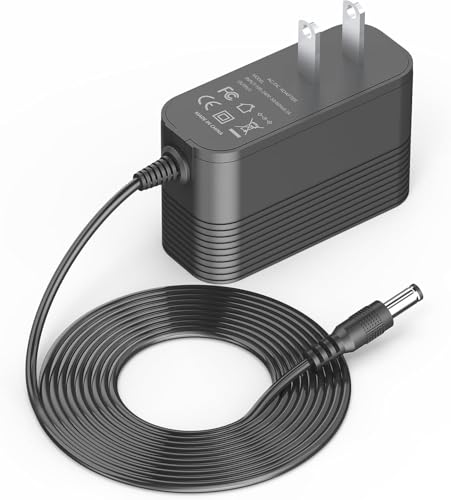
【Compatible Model】Power adapter fit for Vacusion VBS-01 and SunSare KCV02 25.9V Lithium Ion battery cordless stick vacuum cleaner.
Charging Best Practices
- Use the Charging Dock: Always dock your vacuum cleaner at the designated charging station. This method ensures a secure connection to the power source.
- Check Charge Indicators: Observe the charging indicator lights while the vacuum charges. Different colors or patterns often signal the status—fully charged, charging, or an error.
- Use the Correct Charger: Utilize only the charger that came with your vacuum cleaner. Using third-party chargers may result in incompatibility or damage.
- Monitor Charging Duration: Refer to your user manual for the recommended charging time. Overcharging can decrease battery lifespan.
- Disconnect When Charged: Unplug the charger once the battery is fully charged. Leaving it connected for extended periods can lead to battery degradation.
- Clean Battery Contacts: Regularly check and clean the battery contacts on your vacuum cleaner. Dust and debris can affect charging efficiency.
- Store in a Cool Place: Keep your vacuum charger in a cool, dry area. Excess heat can damage battery components.
- Avoid Fully Draining: Recharge your vacuum cleaner before it fully depletes. Lithium-ion batteries benefit from partial discharges for better longevity.
- Perform Regular Maintenance: Schedule upkeep tasks for your vacuum cleaner. Regular maintenance enhances battery health and overall efficiency.
- Consult the User Manual: Refer to your vacuum’s user guide for specific maintenance advice related to the model. Following these recommendations can prolong battery life and performance.
Conclusion
Taking care of your vacuum cleaner’s battery can make a big difference in its performance and longevity. By following the right charging practices and keeping an eye on those indicators you’ll ensure your vacuum’s always ready to tackle any mess.
Remember to store it properly and keep up with regular maintenance. This way you’ll not only extend the life of your vacuum but also enjoy a cleaner home. With a little attention and care your vacuum will serve you well for years to come. Happy cleaning!
Frequently Asked Questions
What are the main types of vacuum cleaners?
There are several types of vacuum cleaners, including upright, canister, robotic, handheld, and stick vacuums. Each type serves different cleaning needs. Uprights are powerful for deep cleaning carpets, while canisters are versatile for various surfaces. Robotic vacuums automate cleaning, and handhelds are great for quick tasks. Stick vacuums are lightweight and convenient for small spaces.
How do vacuum cleaner batteries work?
Vacuum cleaner batteries typically come in two types: lithium-ion and nickel-cadmium. Lithium-ion batteries are more common due to their longer life and lighter weight. They charge quickly and have minimal memory effect. Nickel-cadmium batteries are less expensive but can suffer from reduced performance if not fully discharged regularly.
How do I charge my vacuum cleaner properly?
To charge your vacuum cleaner properly, use the designated charging dock and ensure the vacuum is correctly seated. Monitor the charge indicators to know when it’s fully charged. Always use the charger specified in your user manual, and remember to disconnect it once charging is complete to avoid overcharging.
What tips can I follow for efficient vacuum charging?
For efficient charging, use the provided charging dock, check charge indicators regularly, and utilize the correct charger. Monitor the charging duration to prevent overcharging, and clean battery contacts for better connectivity. Additionally, store your vacuum in a cool place and avoid letting the battery fully deplete.
How can I extend the battery life of my vacuum cleaner?
To extend your vacuum cleaner’s battery life, avoid letting it fully discharge, store it in a cool environment, and perform regular maintenance. Check and clean the battery contacts periodically, follow charging best practices, and refer to the user manual for specific maintenance tips to enhance performance and longevity.
