
Ever wondered why your trusty Dyson vacuum isn’t picking up dirt like it used to? You’re not alone. Many people face this issue after months of use. Dust and debris can build up in places you might not even think to check, affecting its performance.
Key Takeaways
- Understanding Your Dyson: Familiarize yourself with the different types of Dyson vacuums and their unique components to enhance maintenance and performance.
- Preparation for Cleaning: Gather essential tools such as microfiber cloths, warm water, and mild dish soap, while also adhering to safety precautions like unplugging the vacuum and working in a ventilated area.
- Step-by-Step Deep Cleaning: Disassemble the vacuum, clean the filter and dust canister, and maintain the brush bar by removing tangles and dirt, ensuring proper suction and performance.
- Regular Maintenance: Establish a cleaning schedule, empty the dust canister after each use, and check the filter and brush bar regularly to prolong the vacuum’s lifespan.
- Prolonging Lifespan: Use the appropriate settings for different floor types, avoid vacuuming large debris, and store your vacuum correctly to maintain its efficiency.
Understanding Your Dyson Vacuum
Understanding your Dyson vacuum is key to maintaining its performance and extending its lifespan. This section breaks down the types and components of Dyson vacuums, helping you identify what you own and how to care for it effectively.
Types of Dyson Vacuums
Dyson offers several vacuum models tailored for different needs. Here are the main types you might encounter:
- Upright Vacuums: Designed for deep cleaning carpets. Their powerful suction helps lift dirt and pet hair quickly.
- Canister Vacuums: Versatile and lightweight, canister vacuums excel on hard floors and stairs. Their nozzle attachments make them great for detailed cleaning.
- Cordless Stick Vacuums: Ideal for quick clean-ups. These models provide convenience with great suction and maneuverability.
- Robot Vacuums: Automated cleaners that navigate your home for you, picking up dirt and debris while you focus on other tasks.
Identify which type of Dyson vacuum you own to understand its unique features and cleaning capabilities.
Components of a Dyson Vacuum
Familiarizing yourself with the components of your Dyson vacuum aids in proper maintenance. Here’s a closer look:
- Motor: This part generates suction power. Ensure it’s free from clogs to maintain optimal performance.
- Filters: Most Dyson vacuums have washable filters that trap allergens and dust. Rinse them every 1-3 months to ensure efficient airflow.
- Dustbin: The container collects dirt. Empty it regularly to avoid overfilling, which can impact suction.
- Brush Bar: Located in the cleaning head, the brush bar lifts dirt from surfaces. Check it for tangles and clean it as needed.
- Hoses and Attachments: These components allow you to reach tight spaces. Detach and clean them periodically to prevent blockages.
Understanding these types and components empowers you to deep clean your Dyson vacuum effectively, enhancing its performance.
Preparing for Deep Cleaning
Preparing for a deep clean of your Dyson vacuum involves gathering essential tools and supplies and taking necessary safety precautions. Follow these steps for an effective cleaning process.
Recommended Products

[COMPATIBLE WITH DYSON]: This sets compatibles nicely with the vacuum you are using. The adapter can compatible with Dy son V7 V8 V10 V11 V12 V15 etc cordless vacuum cleaner. We have upgraded and designed this patented product, the Dryer Vent Cleaner Kit, to work well with the hoover you are using. Note: Cannot be used with electrically driven tools or floors heads or other brand vacuum cleaner

Dyson V11 Cordless Vacuum, Wand, Docking Station, Charger, Mini Soft Dusting Brush, Crevice Tool, Hair Screw Tool, Motorbar Cleaner Head, Lithium Ion Battery (1)

Motorbar cleaner head deep cleans all floor types. De-tangles wrapped long hair and pet hair as you clean.
Essential Tools and Supplies
Gather these tools and supplies for a successful deep clean:
- Soft Cloths: Use microfiber cloths for dusting and wiping surfaces.
- Warm Water: Warm water helps dissolve dirt and grime.
- Mild Dish Soap: A gentle soap removes stubborn residues without damaging parts.
- Small Brush: A soft-bristled brush assists in cleaning filters and crevices.
- Compressed Air: Use this for dislodging dust in hard-to-reach areas.
- Vacuum Cleaner Bag: If your vacuum has a bag, ensure you have a new one ready.
Safety Precautions
Taking safety precautions prevents accidents and ensures effective cleaning. Keep these tips in mind:
- Unplug the Vacuum: Always unplug the vacuum from the outlet before cleaning.
- Avoid Water Damage: Do not submerge electrical components in water.
- Check for Damage: Inspect cords and parts for wear and tear before use.
- Use Protective Gear: Wear gloves if you’re sensitive to cleaning agents.
- Work in a Ventilated Area: Ensure good airflow while using cleaning products.
By preparing properly and following these guidelines, your deep clean of the Dyson vacuum can be safe and efficient, leading to better performance and longevity.
Step-by-Step Guide to Deep Clean a Dyson Vacuum
Deep cleaning your Dyson vacuum ensures it operates effectively and maintains suction power. Follow these simple steps to get started.
Recommended Products

🟢Compatible replacement: Roller Brush Roll Bar specifically designed for Dyson V6 Old V7 Animal Absolute Cordless Stick Vacuum Cleaner.
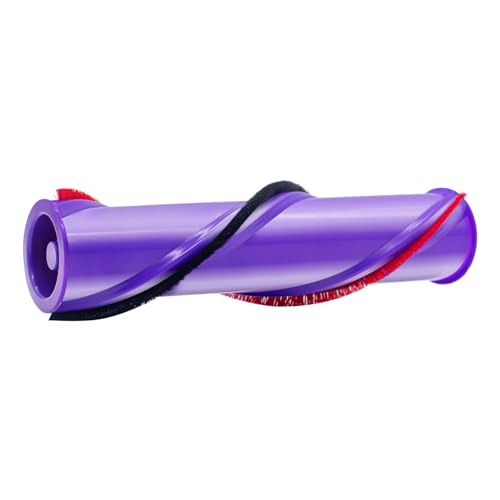
【Compatible Model】Fully compatible with the Dyson V10 SV12 vacuum series. Please ensure that the diameter of your Dyson vacuum tip is 5 cm before ordering.

Compatible with Dyson DC65 DC66 Brand New and High Quality Made of high quality material, more durable. Soft texture, suitable for floor surface
Disassembling the Vacuum
- Unplug the Vacuum: This action prevents accidental activation during cleaning.
- Remove the Dust Canister: Press the release button and pull the canister away from the unit.
- Detach the Filter: Locate the filter compartment, twist the lock, and lift the filter out.
- Take Off the Brush Bar: Remove any screws or clips securing the brush bar, then gently pull it out.
Cleaning the Filter
- Rinse with Water: Hold the filter under cold water until the water runs clear. Avoid using soap or detergents.
- Dry Completely: Allow the filter to air dry for at least 24 hours to prevent damage.
- Check for Clogs: Before reinstallation, inspect the filter for any blockages and remove them if present.
Cleaning the Dust Canister
- Empty the Canister: Open the bottom of the canister over a trash bin to release the debris.
- Wash with Warm Soapy Water: Use a soft cloth and mild dish soap to clean the canister. Rinse thoroughly.
- Dry Fully: Let the canister air dry completely before reattaching it to the vacuum.
Cleaning the Brush Bar
- Remove Hair and Debris: Use scissors or a small brush to cut away and clear any hair or debris tangled around the brush bar.
- Wipe with a Damp Cloth: Clean the bristles and ends of the brush using a damp cloth to remove any remaining dirt.
- Inspect for Damage: Check the brush bar for wear and replace if necessary.
- Replace the Brush Bar: Align the brush bar with the housing and secure it with screws or clips.
- Reinsert the Filter: Ensure the filter is dry and twist it back into place in the compartment.
- Attach the Dust Canister: Align the canister with the vacuum and press it firmly until it clicks into place.
Following these steps keeps your Dyson vacuum in top condition, ensuring efficient performance for your cleaning tasks.
Maintaining Your Dyson Vacuum After Deep Cleaning
To keep your Dyson vacuum running smoothly, maintain a regular cleaning routine and follow some practical tips. Consistent care helps extend the vacuum’s lifespan and ensures it operates efficiently.
Recommended Products
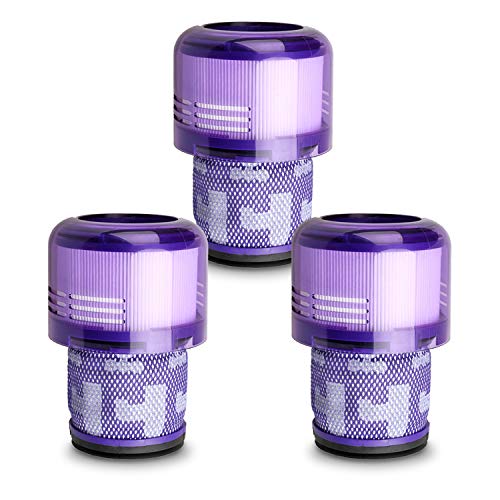
FIT MODELS – V11 V15 Filter Replacement for Dyson V11 Origin Cordless Vacuum (B00FZPRUTY, B0C2J7R8PY) V11 Animal V11 Torque Drive+ V11 Complete V11 Extra V11 Absolute V15 Detect (B0CFRH6NF2, B0CT97D9R2, B0C2J8KJH9) V15s Detect Submarine Vacuums. Compatible with Dyson filter replacement model numbers: Graded SV14, SV15, SV17, SV22, SV28, SV47. Please verify your vacuum model before purchasing to ensure a perfect fit.

Perfect Compatibility: The replacement filter is designed for v7 car + boat vacuum, v7 absolute, v7 animal, v7 animal+, v7 animal vacuum, v7 animal pro, v8 absolute, v8 absolute exclusive, v8 absolute pro, v8 animal, v8 animal+, v8 animal exclusive, v8 animal pro, v8 animal pro+, v8 carbon fiber, sv10, sv11, Replaces to part # 965661-01 & 967478-01. Not fit for V6 vacuums
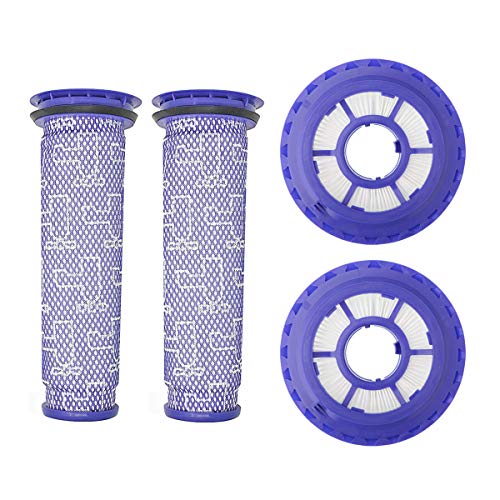
FITS MODELS – These animal filter replacement for Dyson DC41 DC65 DC66 UP13 UP20 UP30 Animal. DC41 Animal, DC41 Animal Complete, DC41 Animal Complete Exclusive, DC41 Animal Exclusive, DC41 Animal Plus, DC41 Animal Total Clean, DC41 Exclusive, DC41 Multi Floor, DC41 Multi Floor Exclusive, DC65 Animal, DC65 Animal Complete, DC65 Animal Complete Exclusive, DC65 Animal Exclusive, DC65 Animal Plus, DC65 Multi Floor, DC65 Multi Floor Exclusive, DC65 Total Clean, UP13 Animal, UP20 Ball Animal 2, UP30 Ball Animal 3, Compare to Part #920769-01&920769-03&920640-01. Doesn't fit for DC40, DC50 filter, Please check the vacuum model before order. For more details see the product picture.
Regular Cleaning Schedule
Set a regular cleaning schedule for your Dyson vacuum. Aim for at least once a month or more frequently if you have pets or live in a dusty area. During each cleaning session, focus on the following tasks:
- Empty the Dust Canister: Don’t wait for it to fill up. Empty it after each use to maintain suction power.
- Check and Clean the Filter: Wash the filter once a month. This keeps airflow steady and prevents blockages.
- Inspect the Brush Bar: Remove hair and debris weekly to prevent tangles and allow for optimal cleaning.
- Run a Visual Inspection: Look for damage or wear and tear on hoses and connectors. This helps catch issues early.
Tips for Prolonging Lifespan
Implement these tips to prolong your Dyson vacuum’s lifespan:
- Use the Right Settings: Adjust settings based on floor types. Utilize the hard floor mode for smooth surfaces and the carpet mode for thicker carpets.
- Avoid Vacuuming Excessive Debris: Large objects can damage the vacuum. Pick up toys and other items before vacuuming.
- Store Safely: Store the vacuum upright in a cool, dry place. Avoid areas with high humidity like bathrooms.
- Keep Cord Untangled: Tangled cords can cause damage. Wrap cords securely, keeping them untangled when storing.
- Replace Parts as Needed: Replace worn-out parts, like filters and brush bars, to maintain performance. Regular replacements promote efficiency.
Following these steps ensures your Dyson vacuum continues to perform effectively, helping you maintain a cleaner home.
Conclusion
Taking the time to deep clean your Dyson vacuum can make a world of difference in its performance. By following the steps outlined and establishing a regular maintenance routine you’ll not only prolong its lifespan but also enjoy a cleaner home. Remember to empty the dust canister after each use and wash the filter monthly. With a little effort you can keep your vacuum running smoothly and efficiently. Happy cleaning!
Frequently Asked Questions
Why do Dyson vacuums lose suction power?
Dyson vacuums may lose suction power due to dust and debris accumulation in the filter, dust canister, or brush bar. Regular cleaning and maintenance are essential to prevent this issue and ensure optimal performance.
How do I deep clean my Dyson vacuum?
To deep clean your Dyson vacuum, disassemble it carefully and clean the filter, dust canister, and brush bar. Ensure all parts are free from dust and debris, and allow them to dry completely before reassembling.
How often should I clean my Dyson vacuum?
It’s recommended to empty the dust canister after each use and wash the filter monthly. Regularly inspect the brush bar and perform a deep cleaning every few months to maintain peak performance.
Can I vacuum large debris with my Dyson?
Avoid vacuuming large debris as it can clog the vacuum and reduce suction. For optimal use, first pick up larger items manually or use a broom before vacuuming.
How can I prolong the lifespan of my Dyson vacuum?
To extend the lifespan of your Dyson vacuum, establish a regular cleaning schedule, maintain the filter and brush bar, store it properly, keep cords untangled, and replace worn-out parts as needed.
