
Got a Shark robot vacuum and a furry friend who sometimes leaves surprises on the floor? You’re not alone! Many pet owners face the challenge of keeping their homes clean while managing the occasional mess. It can be frustrating when your vacuum picks up more than just dirt and dust.
Key Takeaways
- Regular Cleaning is Essential: Keeping your Shark robot vacuum clean enhances its performance and longevity, preventing clogs and potential malfunctions.
- Immediate Action is Crucial: Promptly cleaning up after pet accidents minimizes health hazards and improves overall air quality in your home.
- Follow a Cleaning Routine: Establish a maintenance schedule for vacuum components, including the dust bin, brush roll, and sensors, to ensure efficient operation.
- Understand Proper Cleaning Steps: Power off the vacuum, remove the dust bin, clean the brush roll and sensors, and then reassemble to effectively tackle unpleasant messes.
- Prevent Future Messes: Implement regular maintenance and training strategies to reduce the frequency of indoor accidents and keep your living space cleaner.
Importance Of Cleaning Your Shark Robot Vacuum
Cleaning your Shark robot vacuum ensures optimal performance and longevity. Regular maintenance prevents damage to internal components. Neglecting this task can lead to clogs and malfunction, affecting suction power.
Pet waste can breed bacteria, creating health hazards. Cleaning immediately after incidents minimizes the spread of germs. A clean vacuum also improves the air quality in your home, especially for allergic family members.
Efficient cleaning of your vacuum saves time and effort in the long run. When your vacuum operates smoothly, it requires less energy and fewer repairs. Regular upkeep extends the lifespan of the device, offering better returns on your investment.
Establish a routine for cleaning components. Focus on brushes, filters, and bins. By prioritizing cleanliness, you ensure a reliable cleaning partner for your home.
Steps To Clean Dog Poop From Your Shark Robot Vacuum
Cleaning up after your pet can be frustrating, especially when your Shark robot vacuum encounters dog poop. Follow these steps for a thorough and efficient clean-up.
Gather Necessary Supplies
Collect the following supplies before you start:
- Disposable gloves
- Paper towels or disinfectant wipes
- Mild soap
- Warm water
- A clean, dry cloth
Power Off The Vacuum
Always power off your vacuum before starting the cleaning process. This ensures safety and prevents any accidental activation while you work. Locate the power button, usually found on the top or side of the device, and turn it off.
Remove The Dust Bin
Next, detach the dust bin from the vacuum. This process varies by model, so refer to your user manual if uncertain. Once removed, empty the contents into a plastic bag for disposal.
Clean The Brush Roll
Carefully take out the brush roll. Inspect it for debris or hair that might have accumulated. Use paper towels or disinfectant wipes to clean the brush thoroughly. If necessary, rinse it under warm water. Ensure it’s completely dry before reattaching.
Wipe Down The Sensors
Wipe the sensors with a clean cloth or disinfectant wipe. Dirt and residue can interfere with the vacuum’s navigation and functionality. Ensure all sensors are free from obstructions.
Reassemble The Vacuum
Once all components are clean and dry, reassemble your Shark robot vacuum. Place the dust bin back in its slot and reinstall the brush roll. Once everything is secured, power the vacuum on and check its operation.
By following these simple steps, you’ll keep your Shark robot vacuum in top condition and ready to handle any future messes.
Tips For Preventing Future Messes
Taking proactive steps can reduce the frequency of pet messes around your home. Here are some effective strategies.
Recommended Products
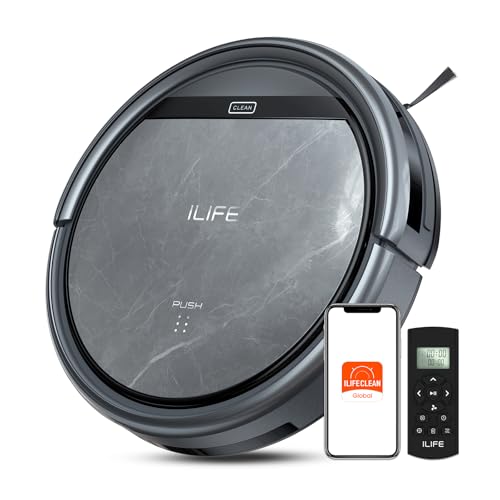
Upgraded from the V5s Plus Robot Vacuum: The V5s Max features with gyroscope navigation, this upgrade ensures systematic routes, less repeated cleaning and missed spots, effectively improve cleaning efficiency and coverage. Furthermore, the V5s Max also improves instances of the robot getting stuck and enhances its ability to automatically return to the charging dock, thereby brings a more efficient whole-home cleaning experience

5000Pa Strong Suction: Robot Vacuum With 5000Pa suction power, it effortlessly removes pet hair, dust, and debris from all types of floors. It can also easily clean on short-pile & medium-pile carpets
Regular Maintenance
Establishing a cleaning routine helps keep your Shark robot vacuum functioning efficiently. Schedule regular emptying of the dust bin at least once a week, or more frequently if you have multiple pets. Clean the brush roll and sensors weekly to prevent buildup that could affect performance. Detailed inspections for hair or debris will help maintain optimal suction. Consider checking filters monthly. This upkeep extends your vacuum’s lifespan and ensures it’s ready for any pet mishaps.
Training Your Dog
Training your dog shapes better bathroom habits, reducing indoor accidents. Start by establishing a consistent schedule for bathroom breaks, especially after meals or playtime. Use positive reinforcement like treats or praise every time your dog goes outside. Monitor your dog for signs they need to go out, such as sniffing around or circling. Investing time in obedience training can further enhance your dog’s understanding of expectations. With patience and consistency, you’ll minimize messes and create a cleaner home environment.
Conclusion
Keeping your Shark robot vacuum in great shape doesn’t have to be a hassle even when dealing with those unexpected pet messes. By following the cleaning steps and maintaining a regular routine you can ensure your vacuum stays efficient and ready for action.
Remember that a little training goes a long way in reducing indoor accidents. With some patience and positive reinforcement you can create a cleaner environment for both you and your furry friend.
With these tips in mind you can enjoy a cleaner home and a happier pet.
Frequently Asked Questions
How can I keep my home clean with pets?
Keeping your home clean with pets requires a proactive approach. Establish a regular cleaning routine, focusing on areas where your pets spend the most time. Use pet-specific cleaning tools, like a vacuum designed for pet hair. Additionally, train your pets to reduce messes indoors and consider implementing a consistent bathroom schedule.
What should I do if my Shark robot vacuum picks up dog poop?
If your Shark robot vacuum picks up dog poop, first power it off. Gather supplies like disposable gloves, soap, and water. Remove the dust bin, clean the brush roll and sensors, and then reassemble the vacuum. This will help restore its functionality and maintain performance.
How often should I clean my Shark robot vacuum?
To keep your Shark robot vacuum in top shape, clean it at least once a week. Empty the dust bin regularly, and clean the brush roll and sensors to prevent clogs and ensure optimal performance.
What are some tips for training my dog to avoid indoor accidents?
To train your dog to avoid indoor accidents, establish a consistent bathroom schedule. Use positive reinforcement to reward them after they go outside. Consistency is key, so be patient and invest time in obedience training to encourage good habits.
Why is regular maintenance important for my vacuum?
Regular maintenance is crucial for your vacuum’s performance and longevity. By cleaning the dust bin, brush roll, and sensors weekly, you prevent clogs and ensure efficient operation. This also reduces the risk of lasting damage and maintains your vacuum’s cleaning power.
