
Have you ever found yourself puzzled about how to turn off your Eufy vacuum? You’re not alone! Many people appreciate the convenience of smart vacuums but occasionally struggle with the basics, like powering them down.
Key Takeaways
- Types of Eufy Vacuums: Eufy offers various models, including robot, cordless stick, and handheld vacuums, catering to different cleaning preferences and tasks.
- Powering Down: Turn off your Eufy vacuum either by pressing and holding the physical power button for two seconds or by using the EufyHome app to select the “Power Off” option.
- Troubleshooting Issues: If your vacuum won’t shut down, try holding the power button longer, using the app, checking the battery, or clearing any physical obstructions.
- Maintenance Practices: Regular battery care, including avoiding overcharging and proper shutdown techniques, can enhance the performance and longevity of your Eufy vacuum.
- Smart Features: Benefits such as smart navigation, multiple cleaning modes, and self-charging capabilities enhance user convenience and cleaning efficiency.
Understanding Eufy Vacuums
Eufy vacuums provide a blend of convenience and efficiency for your cleaning needs. Familiarizing yourself with the different types and common features makes using them smoother.
Types of Eufy Vacuums
Eufy offers various models to suit different preferences and cleaning tasks. Here are some common types:
- Robot Vacuums: These autonomous devices navigate your home, detecting dirt and obstacles. Models like the Eufy RoboVac 11S excel in compact designs and strong suction.
- Cordless Stick Vacuums: These lightweight vacuums offer flexibility for quick cleaning. The Eufy HomeVac series allows for easy maneuverability and storage.
- Handheld Vacuums: Ideal for small messes, the Eufy handheld options are portable and easy to use, perfect for cars and tight spaces.
Common Features
Eufy vacuums come packed with features designed for user convenience. Familiarity with these may enhance your experience:
- Smart Navigation: Advanced models use sensors to map your home, ensuring comprehensive cleaning without getting stuck.
- Multiple Cleaning Modes: From spot cleaning to auto mode, these settings adjust based on your cleaning needs.
- Self-Charging: Most Eufy robot vacuums return to their charging stations automatically when the battery runs low, ensuring readiness for the next cleaning session.
- Quiet Operation: Designed for low noise, many Eufy models allow you to clean without disturbing your daily activities.
By understanding the types and features of Eufy vacuums, you enhance your cleaning experience and simplify your routine.
How to Turn Off Eufy Vacuum
Turning off your Eufy vacuum is straightforward. You can power it down using a physical button or the mobile app.
Using the Power Button
- Locate the power button on your Eufy vacuum. It’s typically found on the top or side.
- Press and hold the power button for two seconds. The vacuum will emit a sound indicating it’s turning off.
- Release the button once you hear the sound. The indicator lights will turn off, confirming the vacuum is off.
- Open the EufyHome app on your smartphone or tablet.
- Ensure your Eufy vacuum is connected to the app.
- Tap on the device icon for your vacuum.
- Select the “Power Off” option in the app menu. The vacuum will shut down remotely.
- Check the status in the app to confirm the vacuum is off. The power indicator will disappear when turned off.
Using these methods lets you easily manage your Eufy vacuum, making cleaning as efficient as possible.
Troubleshooting
Troubleshooting common issues can help you manage your Eufy vacuum effectively. If problems arise, quick solutions can enhance your cleaning experience.
If the Vacuum Won’t Turn Off
If your Eufy vacuum won’t turn off, try these steps:
- Press the Power Button: Locate the power button on the device and hold it for three seconds. This action often turns off the vacuum.
- Check for App Control: Open the EufyHome app. Navigate to the device controls and select “Power Off.” Ensure your vacuum connects to Wi-Fi for app functionality.
- Inspect the Battery: A fault in the battery may prevent shutdown. Ensure it’s charged and properly inserted. Replace it if necessary.
- Examine for Physical Obstructions: Debris or blockages might hinder operations. Clear dust, hair, or dirt from the vacuum’s sensors.
Resetting the Device
Resetting your Eufy vacuum can resolve persistent issues. Follow these instructions:
- Locate the Reset Button: Find the reset button, usually near the battery compartment.
- Press and Hold: Hold the reset button for about five seconds until you hear a beep or see the indicator light flash.
- Reconnect: If using the app, reopen it and reconnect your vacuum. Follow on-screen instructions to set it up again.
These troubleshooting steps ensure your Eufy vacuum operates smoothly and returns to its cleaning duties effectively.
Maintenance Tips
Maintaining your Eufy vacuum helps ensure it operates smoothly. Follow these practices for better performance.
Recommended Products

1.Smart auto recharging design, the robot vacuum automatically returns to charge when low battery, no manual plug and unplug needed.

Easy to clean filter element: The surface is smooth, and dust is not easy to adhere. It can be quickly washed clean during water washing, without the need for laborious scrubbing, saving cleaning time and convenient operation.
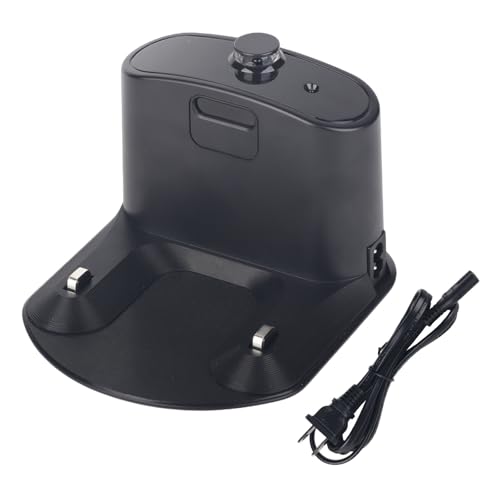
Compatible Models: iRobot Roomba E5, E6, I1, I3, I4, I6, I7, I8 Series Vacuum Cleaners
Proper Shutdown Practices
To properly shut down your Eufy vacuum, press and hold the power button until you see the indicator light turn off. If you experience difficulty turning it off via the button, use the EufyHome app. Navigate to the device settings and select the option to power down. Always ensure the vacuum is on a flat surface when turning it off to avoid any accidental activation.
Battery Care
For optimal battery health, charge your Eufy vacuum regularly but avoid overcharging. Disconnect it from the charger once it reaches full capacity. Store the vacuum in a cool, dry place to extend battery life. If you notice a decrease in runtime, calibrate the battery by fully charging and then completely discharging it once a month. This practice promotes battery longevity and ensures effective cleaning sessions.
Conclusion
Turning off your Eufy vacuum doesn’t have to be a hassle. With just a few simple steps you can ensure your vacuum is powered down properly. Whether you prefer using the physical button or the EufyHome app you’ve got options that suit your style.
Remember to keep an eye on your vacuum’s battery health and follow maintenance tips to keep it running smoothly. Taking these small steps can make a big difference in your cleaning routine. Now you can enjoy a tidy home without the stress of managing your Eufy vacuum. Happy cleaning!
Frequently Asked Questions
How do I turn off my Eufy vacuum?
To turn off your Eufy vacuum, you can either press the physical power button on the device until the indicator light turns off or use the EufyHome mobile app. Within the app, navigate to your vacuum’s controls and select the option to power it down.
What types of Eufy vacuums are available?
Eufy offers a variety of vacuum types, including robot vacuums, cordless stick vacuums, and handheld vacuums. Each type is designed for specific cleaning needs and environments, ensuring users have options that suit their cleaning preferences.
What features do Eufy vacuums have?
Eufy vacuums come with several convenient features such as smart navigation, multiple cleaning modes, self-charging capabilities, and quiet operation. These features are designed to enhance user experience and make cleaning more efficient and hassle-free.
What should I do if my Eufy vacuum won’t turn off?
If your Eufy vacuum won’t turn off, try holding the power button for a few seconds until the indicator light goes off. If that doesn’t work, check the EufyHome app for any remote control options, or refer to the troubleshooting section of the user manual.
How can I maintain my Eufy vacuum’s battery?
To maintain your Eufy vacuum’s battery, charge it regularly but avoid overcharging. Store the vacuum in a cool, dry place and calibrate the battery monthly for optimal performance. This care is essential for enhancing battery longevity and ensuring efficient operation.